|
Listen to this article
Getting your Trinity Audio player ready…
|
There’s nothing more frustrating than picking up your favorite Cake vape, taking a hit, and realizing the device isn’t working because it’s not charging. You might find yourself wondering if the problem is with the battery, the charger, or something else entirely. Don’t worry, though you’re not alone, and the issue is often easier to resolve than you think.
Understanding Your Vape Device
Before diving into troubleshooting, it’s important to understand how your Cake 3.0 Live Resin TKO Blend Disposable Vape works. Devices like these are becoming increasingly popular due to their user-friendly and convenient design. Unlike traditional vapes, the Cake 3.0 is disposable but comes with an integrated rechargeable battery. This means even though you can recharge it, the device is still designed for single use once it’s empty. The built-in charging port allows users to make the most of the 3-gram e-liquid reservoir.
This vape also features an automatic firing mechanism, meaning you don’t have to press any buttons to activate it simply inhale, and the device does the rest. Its highlight, the live resin TKO blend, includes compounds such as THCM, THCA, THCP, and Delta-8 liquid diamonds. To top it off, live resin terpenes ensure a smooth and flavorful experience every time.
But as impressive as these features are, they don’t mean much if your device won’t charge. So why might this be happening? Let’s explore some of the most common reasons and what you can do about them.
Check the Charging Port
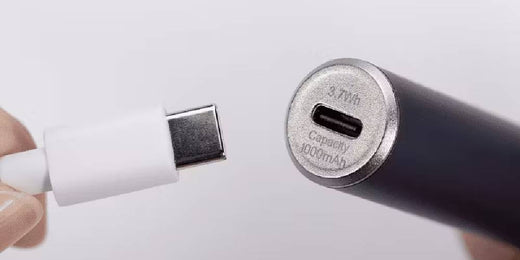
One of the most common reasons a vape device like the Cake 3.0 won’t charge is an issue with the charging port. Since these vapes are small and portable, they are prone to wear and tear. If you’ve been tossing your vape into a bag or pocket without much thought, the charging port could have collected dirt, dust, or lint. Even the smallest debris can disrupt the connection between the charger and the port, making it impossible to charge.
To check the charging port, inspect it closely under good lighting. If you notice any dirt or buildup, you can clean it carefully. A soft, dry brush or a toothpick can work well to remove debris without damaging the port. Avoid using water or harsh cleaning products since those can cause further damage.
If the port looks clean but still isn’t functioning, the issue may be internal. In that case, the port itself might be damaged, and unfortunately, fixing it isn’t always possible on disposable devices.

Ensure Your Charger Is Working
Another reason your Cake vape might not be charging is a faulty charger. While this may seem obvious, many users overlook the charger itself when troubleshooting their vape. Not all chargers are created equal, and using a low-quality charger or one that isn’t compatible can cause problems.
Start by testing your charger on another device that uses the same connection. If it charges other devices without issue, the problem likely lies with the vape rather than the charger. However, if the charger fails to work across multiple devices, you’ve found the culprit. Simply replace the charger with a new, high-quality one that matches the recommended specifications.
It’s also worth noting that USB cables and charging ports can become loose or damaged over time. If you find yourself jiggling the cable to get a connection, the cable or port may need to be replaced.
Inspect the Battery
The integrated rechargeable battery in your Cake 3.0 vape is a big part of what makes it so convenient. However, like all batteries, it has its limitations. If your device has been heavily used, the battery may have reached the end of its lifespan. Rechargeable batteries don’t last forever, and as they age, their ability to hold a charge diminishes.
One way to tell if the battery is the issue is to connect your vape to a charger and observe any indicator lights. Most Cake vapes have LED lights that will blink or glow when the device is charging. If the light doesn’t turn on, this could be a sign that the battery is no longer functioning.
Unfortunately, because the Cake 3.0 is a disposable device, a dead battery means it’s time to replace the vape altogether. While this can be disappointing, it’s worth remembering that disposables are designed for convenience rather than longevity.
Connection Issues Inside the Device
Another potential reason your Cake vape isn’t charging could be an issue with the internal connections. Like any electronic device, disposable vapes rely on a series of small wires and components that work together to power the battery and heating system. If these internal connections become loose, disconnected, or damaged, the vape will no longer charge properly. This can happen for a variety of reasons, such as accidental drops, shaking, or general wear and tear. Even though Cake vapes are designed to be durable, they’re not indestructible, and physical impacts can compromise their internal structure.
It’s important to remember that disposable vapes, like the Cake 3.0 Live Resin TKO Blend, are designed for convenience and simplicity. Unlike reusable vape devices, they aren’t meant to be disassembled or repaired. Once an internal connection is damaged, there’s no easy way for you to access the components or fix the issue without specialized tools. Attempting to open the device can cause further damage and may even be unsafe. In short, while internal connection issues can be frustrating, they’re not something that can typically be resolved by the user.
If you suspect that internal damage is the reason your Cake vape isn’t charging, the best course of action is to replace it with a new one. While this might seem inconvenient, disposable vapes are intended for single-use purposes, and they provide a hassle-free experience when working correctly. By upgrading to a new Cake 3.0 vape, you can enjoy the smooth hits, premium live resin blend, and reliable performance without worrying about internal issues or technical malfunctions. Sometimes, starting fresh with a new device is the simplest and most effective solution.
Overcharging or Undercharging the Battery
While the Cake 3.0 vape comes with an integrated rechargeable battery, ensuring it’s charged correctly is key to keeping the device functioning as intended. Overcharging is a common issue, especially when users leave their devices plugged in for extended periods. This can cause the battery to overheat, which not only shortens its lifespan but may also prevent it from charging properly in the future. On the flip side, undercharging—removing the device from the charger too soon—can lead to the battery not reaching its full capacity. This results in shorter usage time and frequent recharging, which can be frustrating.
To avoid these problems, it’s important to monitor your charging habits. The Cake 3.0 vape typically requires only an hour or two to fully charge, depending on how depleted the battery is. Once the device reaches full capacity, unplug it promptly to prevent overcharging. Leaving it connected for extended periods, such as overnight or for an entire day, increases the risk of overheating and reduces the overall efficiency of the battery. Likewise, cutting the charge short too often can prevent the device from operating at peak performance.
If you’ve started experiencing charging issues with your Cake vape, consider adjusting your charging routine. Treating the battery with care will help extend its lifespan and ensure reliable performance. Always use a high-quality charger that’s compatible with the device, and avoid leaving it unattended while charging. By maintaining good charging practices, you can maximize the performance of your Cake 3.0 vape and avoid unnecessary disruptions while enjoying its smooth and flavorful hits. Taking a little extra care can make all the difference in keeping your vape powered up and ready to use when you need it.
Temperature and Environmental Factors
Believe it or not, environmental conditions can have a significant impact on your Cake vape’s charging performance. Extreme temperatures, whether hot or cold, can interfere with the battery’s ability to hold or accept a charge. For instance, leaving your Cake vape in a hot car during the summer or a freezing backpack in the winter can cause the battery to malfunction. Heat accelerates battery drainage and can even damage internal components, while cold temperatures slow the chemical reactions inside the battery, reducing its efficiency and preventing it from charging altogether.
If your vape has been exposed to extreme temperatures, the best approach is to allow it to return to room temperature before trying to use or charge it. Attempting to charge a battery that’s too hot or too cold can worsen the issue, as the battery will struggle to regulate its charge properly. Letting the device sit for a short time in a moderate environment helps stabilize the battery and restores its normal function. Storing your vape in a cool, dry place when not in use is a simple yet effective way to avoid these temperature-related problems.
Being mindful of environmental factors can go a long way in prolonging the life of your Cake vape and ensuring consistent performance. Avoid leaving it in direct sunlight, inside hot cars, or in extremely cold areas for long periods. A little care in how you store and handle the device can prevent unnecessary charging issues and keep the battery working as it should. By taking these precautions, you’ll ensure that your Cake vape remains reliable, providing the smooth and satisfying experience you expect whenever you pick it up.

Is It Time for a New Vape?
If you’ve tried everything and your Cake vape still won’t charge, it might be time for a new one. While this can be frustrating, it’s important to remember that disposable vapes are designed for convenience rather than long-term use. Devices like the Cake 3.0 Live Resin TKO Blend Disposable Vape provide excellent value, but they won’t last forever.
The good news is that the Cake 3.0 offers a premium experience with its innovative features. From the automatic firing mechanism to the integrated rechargeable battery, this vape is designed for ease of use and maximum enjoyment. Its live resin TKO blend, featuring THCM, THCA, THCP, and Delta-8 liquid diamonds, ensures a smooth and satisfying hit every time. Plus, with 3 grams of total liquid and less than 0.3% Delta-9, you’re getting plenty of product in a single, sleek device.
If your current vape has reached the end of its life, upgrading to a new Cake 3.0 is a great way to continue enjoying a premium vaping experience without the hassle of maintenance or repairs.
Conclusion
When your Cake vape isn’t charging, it can feel like a major inconvenience. However, in most cases, the issue is relatively easy to diagnose. Whether it’s a dirty charging port, a faulty charger, or an aging battery, taking a few simple steps can often help you figure out what’s wrong. If all else fails, it might be time to replace the device and treat yourself to a new Cake 3.0 Live Resin TKO Blend Disposable Vape.
Vaping devices are designed to be easy to use, but like any technology, they can run into occasional hiccups. By keeping your vape clean, using the right charger, and storing it properly, you can minimize charging issues and get the most out of your device. When in doubt, remember that these vapes are disposable, so sometimes the best solution is to start fresh with a new one.
Frequently Asked Questions
Why does my Cake vape stop charging even when I use the right charger?
Sometimes the issue may lie with the charging port or internal connections. If the port has accumulated dirt, debris, or lint, it can disrupt the connection and prevent the device from charging. Additionally, frequent drops or mishandling may damage the internal wiring, which isn’t repairable in disposable vapes. If cleaning the port doesn’t resolve the issue, it’s likely time to replace the device.
How long should I charge my Cake vape to avoid damaging the battery?
A typical charge for the Cake 3.0 vape takes about 1-2 hours, depending on how depleted the battery is. To avoid overcharging, unplug the device as soon as it reaches full capacity. Leaving it plugged in overnight or for extended periods can overheat the battery and reduce its lifespan, so it’s best to monitor the charging process.